SQLite
Smallest possible Traceway deployment: a single Alpine container that uses SQLite for both the main database and telemetry, with the frontend embedded into the Go binary. No external Postgres or ClickHouse required. Blob storage (source maps, session recordings, AI traces) is written to a local folder by default and can optionally be backed by S3.
If your dashboards slow down as telemetry grows, the DuckDB deployment keeps this exact single-container setup but swaps the telemetry store for a columnar engine with far more read headroom.
All persistent state (both SQLite database files and blob storage) lives under /data. Bind-mount that single folder to keep your data across restarts.
This image runs as a single instance. Both databases are local files under /data, so a second container cannot share them or learn about the first one's writes. Running more than one backend instance needs the PostgreSQL + ClickHouse build; see Running more than one instance.
Quick Start
Pull the pre-built image and run it with a persistent data volume:
docker pull ghcr.io/tracewayapp/traceway:sqlite

docker run -d --name traceway \
  -p 80:80 \
  -v "$(pwd)/traceway-data:/data" \
  -e JWT_SECRET="your-jwt-secret-min-32-characters-long" \
  -e APP_BASE_URL="https://traceway.example.com" \
  ghcr.io/tracewayapp/traceway:sqlite
Both SQLite files (traceway.db, traceway_telemetry.db) and uploaded blobs (under storage/) land inside the mounted folder.
After starting, open http://localhost/register to create your first account.
Build from Source
Only needed if you want to run a custom or modified build:
docker build -f Dockerfile.sqlite -t traceway:sqlite .Then use traceway:sqlite instead of ghcr.io/tracewayapp/traceway:sqlite in the commands above.
Run (S3 storage)
To offload blob storage to S3 (or any S3-compatible service like MinIO, Cloudflare R2, or DigitalOcean Spaces), set STORAGE_TYPE=s3 and provide the S3 credentials. SQLite still lives on disk under /data.
docker run -d --name traceway \
  -p 80:80 \
  -v "$(pwd)/traceway-data:/data" \
  -e JWT_SECRET="your-jwt-secret-min-32-characters-long" \
  -e STORAGE_TYPE="s3" \
  -e S3_BUCKET="your-bucket" \
  -e S3_REGION="us-east-1" \
  -e S3_ACCESS_KEY="your-access-key" \
  -e S3_SECRET_KEY="your-secret-key" \
  ghcr.io/tracewayapp/traceway:sqlite
For non-AWS providers add -e S3_ENDPOINT="https://s3.example.com". If S3_ACCESS_KEY and S3_SECRET_KEY are omitted, the AWS SDK falls back to the default credential chain (IAM role, environment, shared config).
If STORAGE_TYPE is unset (or set to local), blobs are written to /data/storage, the same volume as the SQLite files. No extra mounts are needed.
Configuration
| Variable | Default | Description |
|---|---|---|
JWT_SECRET | (required) | Signs all authentication tokens (dashboard sessions and CLI/MCP device logins). Use a strong, unique secret of at least 32 characters (openssl rand -hex 32) and keep it stable. See CLI Authentication. |
APP_BASE_URL | (unset) | Public URL of your instance. Used for SDK setup snippets, password-reset emails, OAuth callback URLs, deep links in notifications, and the CLI/MCP OAuth issuer plus device-login verification URL. If unset, the device-auth and /.well-known endpoints derive it per-request from the Host / X-Forwarded-* headers. See CLI Authentication |
TRUSTED_PROXIES | (loopback) | Comma-separated CIDRs of the proxies in front of Traceway whose X-Forwarded-For / X-Real-IP is trusted for the real client IP. Every per-IP rate limit keys on it, and /api/report stores it as each session's client.ip. Unset trusts loopback only, so a proxy container on a Docker network or an in-cluster ingress has to be listed before its header counts. A value replaces the default, so list every hop between the client and this server, not just the outermost one: naming only a CDN leaves a private ingress untrusted and turns X-Forwarded-For off entirely. * trusts every peer and lets clients spoof their address. Until the proxy is listed, every visitor shares one rate-limit bucket keyed on the proxy, and the server logs a warning the first time it sees a forwarding header from a peer it does not trust. |
TRUSTED_PROXY_HEADER | (none) | A header taken as the client IP on every request, ahead of TRUSTED_PROXIES: X-Real-IP behind ingress-nginx, CF-Connecting-IP behind Cloudflare. Only safe when every request provably passes through a proxy that overwrites the header; a directly reachable backend lets clients set it freely. |
REPORT_MAX_BODY_MB | 64 | Cap on the decompressed /api/report and /api/profiles/ingest body in megabytes. Gzip does not raise it. A body over the cap answers 413. |
INGEST_MAX_CONCURRENT | (2 x CPU cores, min 4) | Telemetry ingest requests processed at once (/api/report, /api/profiles/ingest, /api/otel/*). Excess requests wait up to INGEST_ADMISSION_WAIT_SECONDS (default 5) and then get 503 with Retry-After; past a bounded waiting room (four times the capacity, at least 16) they are turned away immediately. Each admitted request can hold a decoded body, so on a memory-capped container size this from the memory limit rather than the CPU count. |
UPLOAD_MAX_CONCURRENT | 4 | Source map and symbol uploads processed at once. Each holds a whole file in memory while it is parsed. Excess uploads wait 30 seconds and then get 503. Separate from the ingest pool so a CI burst cannot starve telemetry. |
SQLITE_PATH | /data/traceway.db | Main SQLite file. Telemetry DB is derived as <path>_telemetry.db |
STORAGE_TYPE | local | Blob storage backend. local or s3 |
STORAGE_PATH | /data/storage | Folder for local blob storage. Ignored when STORAGE_TYPE=s3 |
S3_BUCKET | (unset) | Required when STORAGE_TYPE=s3 |
S3_REGION | (unset) | Required when STORAGE_TYPE=s3 |
S3_ACCESS_KEY | (unset) | Optional. Falls back to the default AWS credential chain when unset |
S3_SECRET_KEY | (unset) | Optional. Pair with S3_ACCESS_KEY |
S3_ENDPOINT | (unset) | Optional. Set for S3-compatible providers (MinIO, R2, Spaces). Enables path-style URLs |
PORTS | 80,8082 | Comma-separated list of HTTP ports the server should listen on. Every port is bound before the server reports itself started; a port that cannot be bound (commonly :80 when not running as root) logs a warning and is skipped, and startup fails only if none of the ports could be bound |
GIN_MODE | release | Gin runtime mode |
SQLITE_RETENTION_DAYS | 30 | Days to keep telemetry rows (endpoints, exceptions, spans, metrics, logs, sessions, recordings, fired notifications, notification history). A background worker prunes older rows once at startup and then every hour. Set to 0 to disable. |
LOG_RECORDS_MAX_ROWS | (unset) | Optional cap on the number of log rows, independent of SQLITE_RETENTION_DAYS. This is not a hard limit: a cleanup task runs every minute and deletes the oldest logs until only the newest N rows remain. Between runs the table can grow past N, and if you ingest more than N rows in a single minute the table (and disk usage) will exceed the cap until the next cleanup. Size it with headroom for your peak ingest rate. Unset or 0 disables the cap. |
SESSION_RECORDING_RETENTION_DAYS | 30 | Days to keep session recording files on disk under STORAGE_PATH/recordings/. Files older than the TTL are deleted hourly and on startup; empty subdirectories are removed. No effect when STORAGE_TYPE=s3. Set to 0 to disable. |
SSO (optional)
Adds Continue with Google / Continue with GitHub buttons to the login and register pages. See the SSO guide for the full provider setup walkthrough.
When configuring providers, set the callback URL on the provider side to <APP_BASE_URL>/api/auth/callback/{google|github}.
| Variable | Default | Description |
|---|---|---|
GOOGLE_CLIENT_ID | (unset) | Google OAuth client ID. Setting both Google variables enables the Google button. |
GOOGLE_CLIENT_SECRET | (unset) | Google OAuth client secret. |
GITHUB_CLIENT_ID | (unset) | GitHub OAuth App client ID. Setting both GitHub variables enables the GitHub button. |
GITHUB_CLIENT_SECRET | (unset) | GitHub OAuth App client secret. |
OAUTH_SESSION_SECRET | (falls back to JWT_SECRET) | Cookie signing secret for the OAuth round-trip. Override to rotate independently of JWT_SECRET. |
Persistence
The image declares VOLUME ["/data"]. Mount a host folder or a named volume there to keep everything across restarts:
/data/
├── traceway.db              # users, organizations, projects, ...
├── traceway.db-wal          # SQLite WAL
├── traceway.db-shm          # SQLite shared memory
├── traceway_telemetry.db    # endpoints, exceptions, spans, metrics, ...
├── traceway_telemetry.db-wal
├── traceway_telemetry.db-shm
└── storage/                 # source maps, session recordings, AI traces (when STORAGE_TYPE=local)
Backup tip: stop the container or use sqlite3 traceway.db ".backup '/path/to/backup.db'" for a hot backup. WAL files are required for crash recovery, so when copying files manually, copy *.db, *.db-wal, and *.db-shm together.
Access Points
| URL | Description |
|---|---|
http://localhost/ | Frontend dashboard |
http://localhost/api/* | Backend API |
http://localhost/health | Health check |
Useful Commands
# View logs
docker logs traceway
docker logs -f traceway

# Enter container shell
docker exec -it traceway sh

# Health check
curl http://localhost/health

# Hot backup of the main database
docker exec traceway sh -c "apk add --no-cache sqlite >/dev/null && sqlite3 /data/traceway.db \".backup '/data/traceway.backup.db'\""

# Stop and remove (data survives in the mounted volume)
docker stop traceway && docker rm traceway
Deploying to Railway
Railway (opens in a new tab) builds and runs the image from your GitHub repository, mounts a persistent volume at /data, and gives you a public HTTPS URL, a great fit for the SQLite deployment.
1. Connect the repo. Push the project to GitHub, then in Railway choose New Project → Deploy from GitHub repo and pick the Traceway repository.
2. Point Railway at Dockerfile.sqlite. Open Settings → Build on the service and set Custom Dockerfile Path to Dockerfile.sqlite. Railway will use that Dockerfile for every deploy.
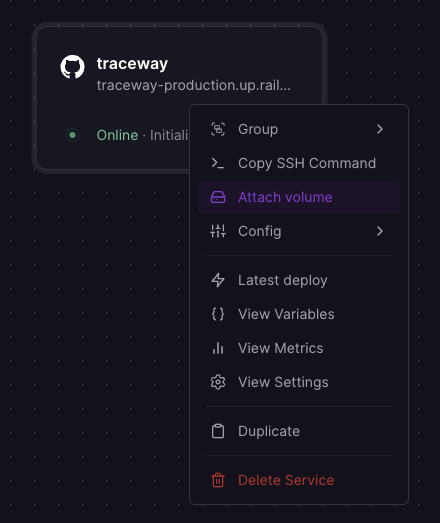
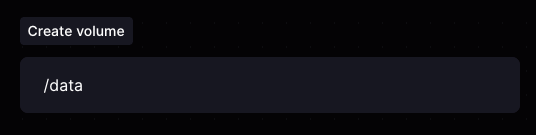
3. Attach a volume at /data. Right-click the service tile and pick Attach volume, then enter /data as the mount path. Without this, your SQLite files and uploaded blobs get wiped on every redeploy.
4. Set environment variables. Open Variables and add:
| Variable | Value | Notes |
|---|---|---|
JWT_SECRET | a random string ≥ 32 chars | Required. Generate with openssl rand -hex 32 |
PORTS | ${{PORT}} | Railway exposes a single port via PORT. The app's PORTS setting accepts a single value, so this binds the server where Railway expects it |
APP_BASE_URL | https://<your-service>.up.railway.app | Optional but recommended once you generate a domain. Makes SDK snippets, reset emails and the deep links in notifications point at the right URL |
To use external object storage, also set STORAGE_TYPE=s3, S3_BUCKET, S3_REGION, S3_ACCESS_KEY, S3_SECRET_KEY, and optionally S3_ENDPOINT. Otherwise blobs are written to /data/storage on the volume you added above.
5. Generate a domain. Open Settings → Networking → Generate Domain. Once Railway returns the *.up.railway.app URL, update APP_BASE_URL to match and redeploy.
6. Create the first user. Visit https://<your-domain>/register and create your account and organization. The first registered user automatically becomes the organization owner.
7. Point your SDKs at the new instance.
<project_token>@https://<your-domain>/api/report